Watch the Video Guide
What is WhatsApp Cloud API?
WhatsApp Cloud API is the official Meta solution to connect your WhatsApp Business number with Thikaa. As a certified Meta partner, bot replies and notifications are free — only marketing messages are paid. It allows you to provide smart 24/7 support through the official API.
Benefits
24/7 Instant Response
AI assistant responds to customer inquiries instantly even outside working hours
Multi-language Support
Understands and responds in Arabic, English and 50+ languages
Smooth Handoff
Transfer conversation to human support when needed
Store Integration
Connect with Salla or WooCommerce for order and product tracking
How Does It Work?
Customer Messages You
Customer sends a message to your WhatsApp Business number
Thikaa Receives
Thikaa receives the message and understands its content with AI
Smart Response
Customer is responded to based on your store info and FAQs
Handoff When Needed
If customer needs human support, conversation is transferred to your team
Setup Steps
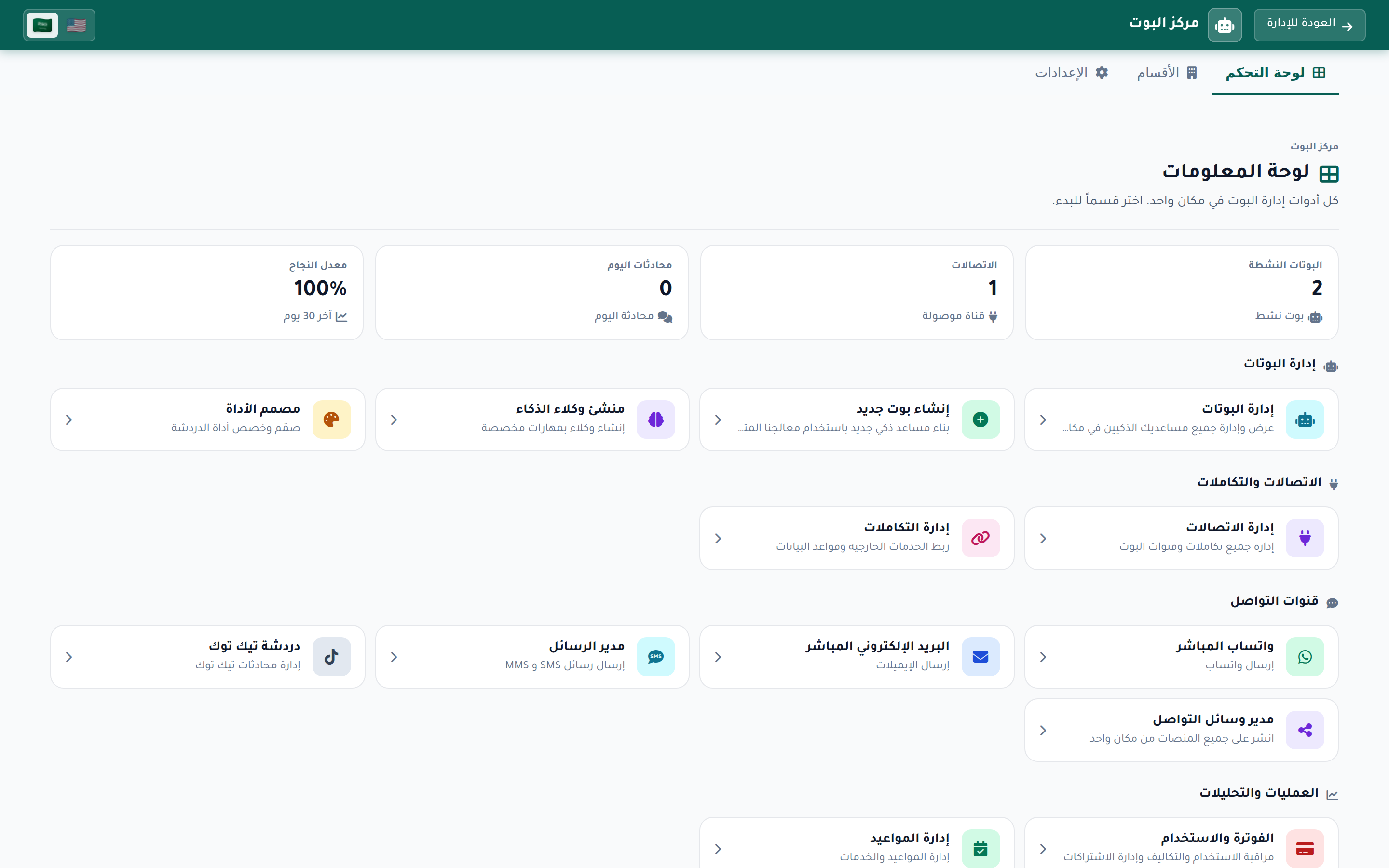
Open Bot Hub
From the Thikaa dashboard, click "Bot Hub" in the top bar. You will see the main dashboard with stats (success rate, today's conversations, connections, active bots) and quick cards for managing bots and creating new ones.
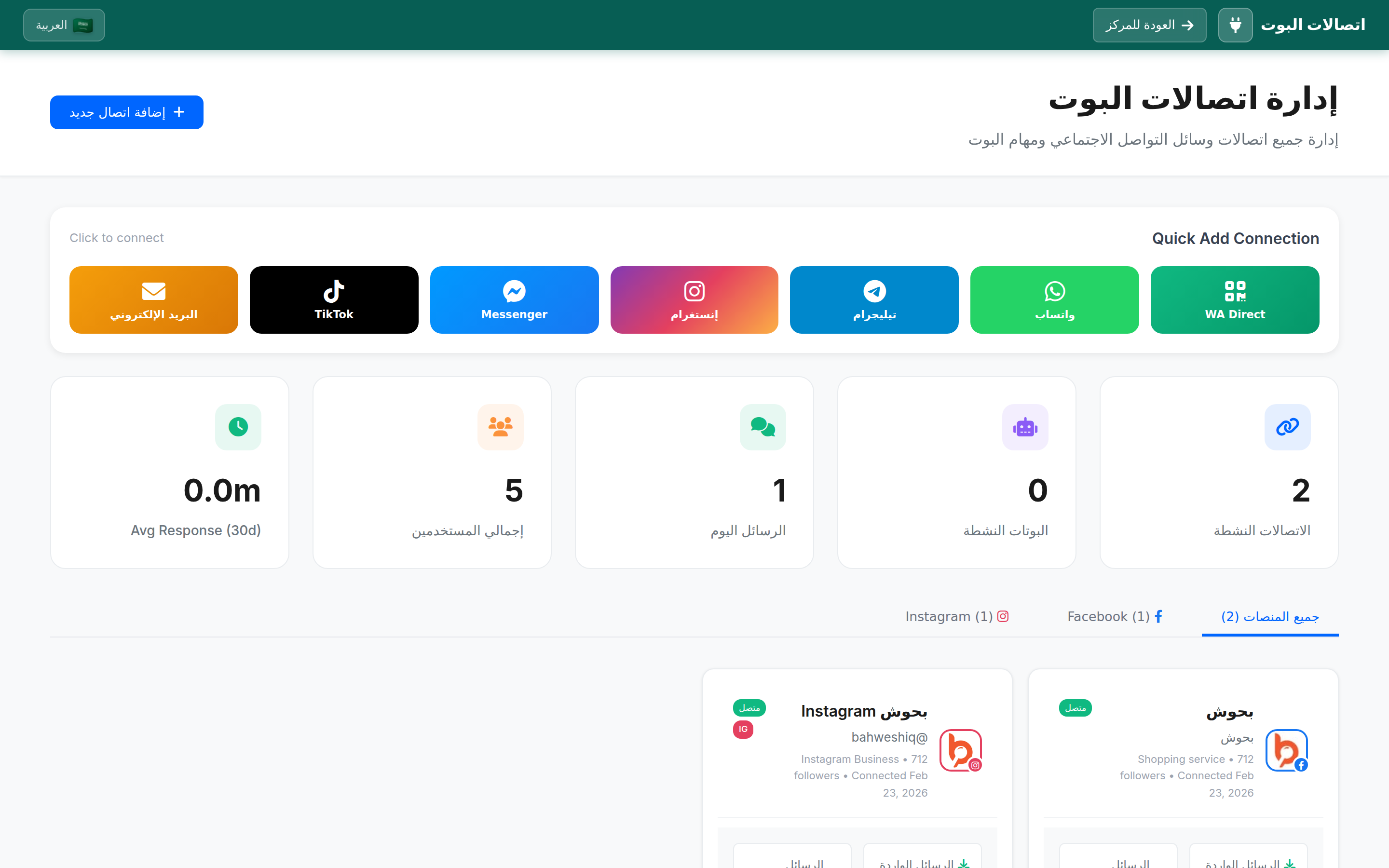
Open Connections
Click "Connections" from the menu or the connections card on the dashboard. You will see the "Bot Connections Management" page with quick-connect buttons for all channels (WhatsApp, WA Direct, Telegram, Instagram, Messenger, Email).
Open WhatsApp Business Integration
Click the green "WhatsApp" button from the quick-connect buttons. You will go to the "WhatsApp Business Integration" page, which is the main page for WhatsApp Cloud API setup. You will find:
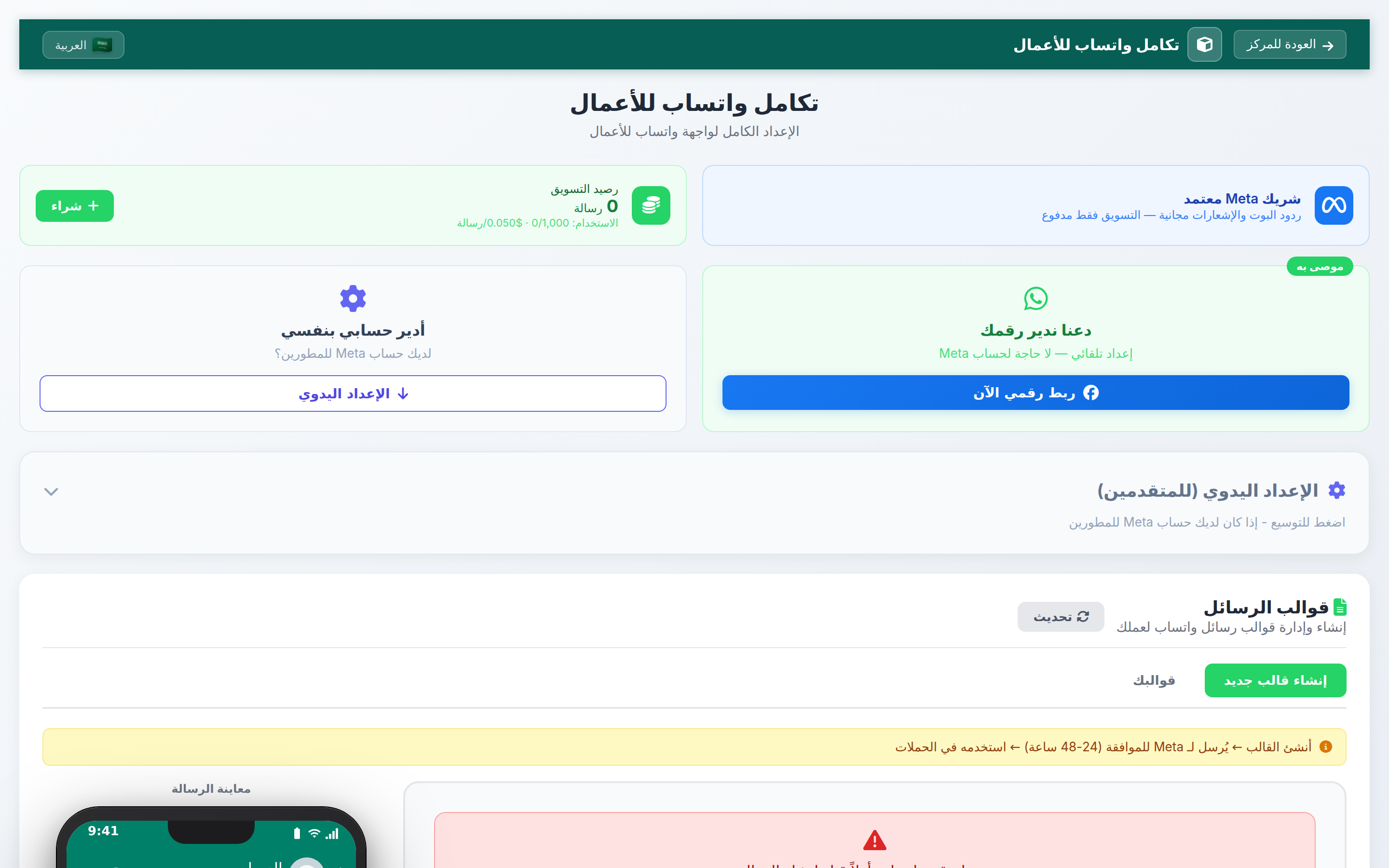
Setup Options
Option A: Let Us Manage Your Number (Recommended)
This is the easiest and recommended option. Click the blue "Connect my number now" button on the right side of the page (marked with the green "Recommended" badge). You don't need a Meta account — Thikaa manages everything for you.
- Platform — selected automatically
- Authentication — sign in via Facebook
- Choose Pages — select the WhatsApp account to connect
- Choose Bot — select which bot receives messages

Option B: I Manage My Account Myself
If you have a Meta developer account and prefer manual setup, click "Manual Setup" on the left side. You can also use the expandable "Manual Setup (for Advanced Users)" section located below the two setup options.
Access Token— Access token from Meta BusinessPhone Number ID— Phone number identifierBusiness Account ID— Business account identifier
Message Templates
After successfully connecting WhatsApp, you can create message templates for proactive communication with your customers. At the bottom of the "WhatsApp Business Integration" page, you will find the "Message Templates" section with a "Create New Template" button.
Test and Launch
Send a test message to the connected WhatsApp number to verify the bot is working. If the bot receives the message and responds successfully, the setup is complete and ready for your customers.
Advanced Features
Use Cases
Customer Support
Answer common inquiries and track orders
Order Notifications
Automatically send order status updates to customers
Receive Orders
Receive and confirm orders via WhatsApp
Marketing
Send offers and updates to customers via message templates
Pricing
As a certified Meta partner:
- Bot replies and notifications are free
- Only marketing messages are paid (per Meta pricing for your country)
- Marketing balance is shown on the WhatsApp Integration page
Frequently Asked Questions
Do I need a Meta developer account?
No! With the recommended "Let us manage your number" option, you don't need any Meta account. Just click "Connect my number now" and sign in with your regular Facebook account.
Can I use my current number?
Yes, you can connect your current WhatsApp Business number. It will be converted to use Cloud API.
What is the difference between WhatsApp Cloud API and WA Direct?
WhatsApp Cloud API is the official Meta solution that supports message templates and marketing. WA Direct uses a different technology and doesn't need a Meta account but doesn't support templates.
Are bot replies really free?
Yes, as a certified Meta partner, bot replies and notifications are completely free. Only proactive marketing messages (via templates) have a cost.
How many marketing messages can be sent?
You can purchase marketing balance from the WhatsApp Integration page. Cost depends on the recipient's country and starts at $0.050 per message.
What permissions are required when connecting Facebook?
The system requests permissions: view Facebook pages, send and receive messages, manage page data, read engagement metrics, manage engagement, read user content, and manage business assets. All are necessary for the bot to function.
Ready to Start?
Open Bot Hub and connect WhatsApp now — automatic setup in minutes